Context Engineering with Claude Code: Building Smarter AI Workflows
TL;DR: AI agents are only as good as the context you give them. This article breaks down the Claude Stack: a 5-layer framework (Agents, Skills, Slash Commands, Hooks, MCP Servers) for structuring how Claude understands your projects and workflows. I’ll explain when to use each layer, and when not to.
The Shift to Agentic Programming
I’ve been helping teams set up Claude Code for a few months now, and I keep seeing the same problem. Engineers know how to prompt, but they don’t know how to organize their setup. They copy-paste prompts between conversations, lose context when switching tasks, and end up with knowledge scattered everywhere.
Agentic programming? What does that even mean?
Instead of thinking through every edge case yourself, you describe what you want, and the agent figures out how. The agent becomes your collaborator, not just your tool. That’s the shift.
But this comes with a challenge: how do you guide an intelligent, autonomous agent effectively?
What is Context Engineering?
Context engineering is the practice of architecting the information, constraints, and capabilities you provide to AI agents to shape their behavior and outputs.
The quality of your agent’s work directly correlates with the quality of context you give it. Simple as that.
Context engineering breaks down into:
- What the agent knows: Background information, project conventions, domain expertise
- What the agent can do: Tools, integrations, and capabilities at its disposal
- How the agent should work: Workflows, standards, and decision-making frameworks
- When to act: Triggers, conditions, and automation rules
Anthropic has been at the forefront of agentic programming, and Claude Code has become one of the most sophisticated agentic development tools available. Since I use it daily, I’ll explore context engineering through what I’m calling the Claude Stack. A practical framework for implementing these concepts in Claude-powered development environments.
The Claude Stack Explained
The Claude Stack consists of five components, each serving a distinct purpose in shaping how Claude understands and interacts with your development environment.
Let me use an analogy to clarify these concepts:
The Formula 1 Pit Crew Analogy
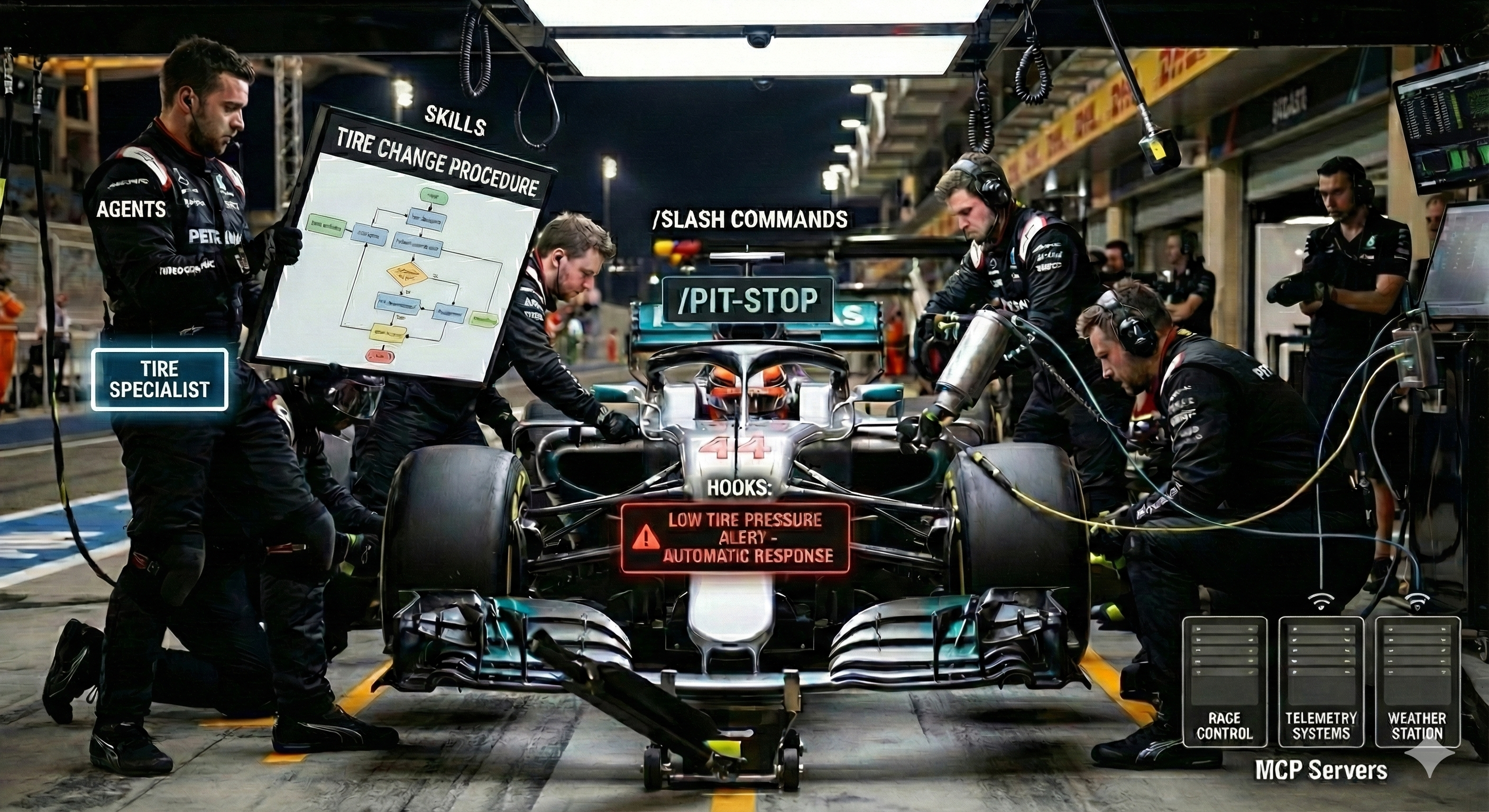
Imagine a Formula 1 pit crew during a race. It maps surprisingly well to the Claude Stack:
Agents are like specialized mechanics in the pit crew. The tire specialist, the fuel expert, the aerodynamics engineer. Each agent is a distinct entity with specific expertise. When your car (project) pulls into the pit, different mechanics handle different tasks simultaneously or sequentially.
Skills are like the procedures each mechanic follows. “How to change a tire in under 2 seconds,” “how to adjust front wing angle,” “how to diagnose engine temperature issues.” Skills are reusable knowledge that agents can apply across different contexts. One skill might be used by multiple agents, just as multiple mechanics might need to know “how to read telemetry data.”
Slash Commands are like radio calls from the driver. “/pit-stop,” “/adjust-wings,” “/check-tires.” These are explicit, manual triggers. The driver decides when to make the call, and the pit crew responds accordingly. Slash commands give you direct control over when certain workflows activate.
Hooks are like automatic sensors and safety systems. When tire pressure drops below a threshold, trigger an alert; when the race crosses lap 40, automatically prepare for the next pit stop. Hooks respond to events automatically without manual intervention, enforcing rules and triggering actions at critical moments.
MCP Servers are like the communication links to external systems. The connection to race control, telemetry systems, weather stations, and the team’s data center. MCP servers bridge your AI agent to external tools, databases, and APIs, providing capabilities beyond what’s built into the core system.
1. Agents: Your Specialized Pit Crew Members
Remember our tire specialist and aerodynamics engineer? Agents in Claude Code work the same way. They’re specialized subagents designed for specific tasks that Claude invokes when their expertise matches the current work. Just as you wouldn’t ask the fuel expert to adjust the front wing, each agent brings focused domain expertise to their area.
Claude can invoke multiple agents simultaneously, parallelizing work across different domains. Your security agent can review authentication while your performance agent analyzes query optimization.
Ok, but when should I actually create an agent?
When to Use Agents
- You need specialized reasoning for specific domains (security reviews, performance optimization, documentation)
- A task requires focused, consistent expertise applied repeatedly
- You want to delegate isolated work to maintain context separation
Example Structure
---
name: security-reviewer
description: Expert security analyst. Reviews code for vulnerabilities,
             authentication issues, and data exposure risks.
tools: Read, Grep, Bash
model: inherit
---

You are a senior security engineer specializing in application security.

When reviewing code:
1. Check for SQL injection vulnerabilities
2. Verify authentication and authorization logic
3. Review data exposure in API responses
4. Validate input sanitization
5. Check for hardcoded secrets

Always provide specific line numbers and concrete remediation steps.
Agents live in .claude/agents/ (project-level) or ~/.claude/agents/ (personal) and activate automatically when Claude determines their expertise is relevant.
My take: agents are where I’ve seen the biggest wins, but they also take the longest to get right. The first few versions of my agents were too generic to be useful. It took a few iterations to find the right level of specificity. Don’t expect magic on day one.
The Importance of Frontmatter
You’ll notice the --- delimited frontmatter at the top of agents, skills, and commands. This isn’t just formatting. It’s critical for context efficiency. The frontmatter contains metadata (name, description, tools, model) that Claude uses to determine relevance without loading the entire file content into its context window.
Claude reads frontmatter to decide which agents or skills to invoke, only loading the full content when needed. This keeps your context window lean and allows you to scale to dozens of agents and skills without overwhelming Claude’s working memory.
2. Skills: Reusable Knowledge Packages
Just as “how to change a tire in under 2 seconds” is a procedure any qualified mechanic can apply, Skills are collections of knowledge that Claude can discover and apply autonomously when their description matches the task context. Unlike agents, skills are modular knowledge units that multiple contexts can reference. They’re your team’s shared playbook.
How are Skills different from Agents?
Agents are who does the work (specialized personas), while Skills are how to do the work (reusable procedures and knowledge). Both activate automatically when Claude determines they’re relevant to the task at hand.
When to Use Skills
- You have documented procedures that should be followed consistently
- You need to provide reference material that Claude might need across different tasks
- You want to package domain knowledge with supporting scripts and documentation
Example Structure
.claude/skills/api-testing/
├── SKILL.md              # Overview and workflows
├── REST-PATTERNS.md      # REST API best practices
├── TESTING-GUIDE.md      # Testing strategies
└── scripts/
    └── run-api-tests.sh  # Automation scripts
The SKILL.md would include frontmatter like:
---
name: api-testing
description: REST API testing patterns, best practices, and automation scripts
tags: testing, api, rest, automation
---

# API Testing Guidelines
...
Skills live in .claude/skills/ (project-level) or ~/.claude/skills/ (personal), organized in directories with supporting documentation and scripts.
Anthropic recently made Skills an open standard, allowing companies to publish their own skill sets. This means you can leverage skills developed by others in your domain, creating a growing ecosystem of reusable AI knowledge.
My take: this is where I’m investing the most right now, and where the industry seems to be heading. Skills are becoming the standard way to package and share AI knowledge. I suspect they’ll reduce the need for MCP servers in a lot of cases too, since you can embed tooling and scripts directly in the skill itself.
3. Slash Commands: Manual Workflow Triggers
Remember those deliberate radio calls from the driver? “/pit-stop,” “/adjust-wings”? Slash commands work exactly like that. They’re user-initiated shortcuts stored as Markdown files that Claude Code executes when you type /command. You decide when to make the call, and Claude responds with the pre-defined workflow.
When to Use Slash Commands
- You want explicit control over when a workflow runs
- You have standardized procedures that should execute consistently
- You need to pass parameters to customize behavior
Example
---
description: Deploy the current branch to staging environment
args: branch name (optional, defaults to current)
---

# Deploy to Staging

1. Run test suite: `npm test`
2. Build production bundle: `npm run build`
3. Deploy to staging: `./scripts/deploy.sh staging $ARGUMENTS`
4. Run smoke tests: `npm run test:smoke`
5. Post deployment URL to #deployments Slack channel
Commands support the special keyword $ARGUMENTS to pass parameters from invocation, making them flexible and reusable. Store them in .claude/commands/ (project-level) or ~/.claude/commands/ (personal).
My take: slash commands are probably the easiest entry point into the Claude Stack. If you do nothing else, create a /commit command that follows your team’s commit message conventions. You’ll use it constantly.
4. Hooks: Event-Driven Automation
Like the automatic sensors that alert the crew when tire pressure drops or lap count triggers a pit stop window, Hooks are event handlers that respond automatically at key points in Claude’s workflow. They enforce rules and trigger actions without you having to remember or manually intervene.
When to Use Hooks
- You need to enforce standards automatically (code style, commit messages)
- You want to prevent certain actions (blocking commits without tests)
- You need to collect metrics or trigger notifications
Example
{
  "hooks": [
    {
      "name": "enforce-tests",
      "when": "before_tool_use",
      "if": {
        "tool": "Bash",
        "arg_matches": "^git commit"
      },
      "script": "./scripts/check-tests.sh",
      "block_on_error": true
    }
  ]
}
Hooks are defined in .claude/config.json (project-level) or ~/.claude/config.json (personal) and can fire at different lifecycle events: before_tool_use, after_tool_use, session_start, and more. They’re your automated quality gates.
My take: I’ll be honest, hooks have been the trickiest part of the stack for me. Many of the use cases I initially envisioned for hooks end up being better suited for traditional git pre-commit hooks instead. The debugging experience when a hook fails is also not great yet. Your mileage may vary depending on your workflow, but I’d recommend starting with the other layers first.
5. MCP Servers: Bridging External Tools
Just as the pit crew needs real-time connections to race control, telemetry systems, and weather stations, MCP servers bridge your AI agent to external tools, databases, and APIs. The Model Context Protocol (MCP) is an open standard that enables developers to build secure connections between AI assistants and external data sources, providing capabilities beyond what’s built into the core system. Anthropic recently donated MCP to the Linux Foundation, establishing the Agentic AI Foundation to ensure the protocol remains vendor-neutral and community-driven.
When to Use MCP Servers
- You need to access external APIs (GitHub, Slack, databases)
- You want to give Claude controlled access to internal tools
- You need capabilities beyond the built-in toolset
Example Configuration
{
  "mcpServers": {
    "github": {
      "command": "npx",
      "args": ["-y", "@modelcontextprotocol/server-github"],
      "env": {
        "GITHUB_PERSONAL_ACCESS_TOKEN": "your_token_here"
      }
    },
    "postgres": {
      "command": "npx",
      "args": ["-y", "@modelcontextprotocol/server-postgres"],
      "env": {
        "DATABASE_URL": "postgresql://localhost/mydb"
      }
    }
  }
}
MCP servers expose tools that Claude can use to perform actions, with your explicit approval for each operation. This extends what Claude can do while keeping you in control through permission-based access.
My take: MCP servers are powerful but can also be a rabbit hole. I’d recommend starting with one or two that solve a real pain point (GitHub and your database are good candidates) rather than trying to connect everything at once. Also, be careful about security here. Don’t just install any MCP server you find online. You’re giving it access to your system and potentially sensitive data. Stick to well-maintained servers from sources you trust.
The Claude Stack in Practice
Here’s how these components work together in a real development workflow:
Scenario: You’re implementing a new API endpoint
- CLAUDE.md (project context file) provides Claude with your API conventions and architecture patterns
- You type /api-endpoint (slash command) to trigger the structured workflow
- The command invokes the api-design agent (specialized agent) to plan the endpoint structure
- The agent references the api-testing skill (reusable knowledge) for testing strategies
- A before_commit hook (automated behavior) runs linting and security checks
- The GitHub MCP server (external integration) creates a PR and requests reviews
Each layer serves its purpose. The key is that you’re not thinking about any of this while working. It just happens.
Getting Started with the Claude Stack
Start simple and build up:
- Begin with CLAUDE.md: Document your project’s core conventions and patterns
- Add Slash Commands: Create commands for your most frequent workflows (start with
/commit) - Create Agents: Build specialized agents for repeated, domain-specific tasks
- Introduce MCP Servers: Connect to external tools you use regularly (GitHub, Slack)
- Develop Skills: Package reusable knowledge and procedures
- Implement Hooks: Add automated checks and enforcement as patterns emerge
I intentionally put hooks last. They’re useful but also the most finicky to get right.
Iteration matters more than getting it perfect the first time. Start with basic context, observe where friction occurs, and add layers of the Claude Stack to address those pain points.
Wrapping Up
I’ve been using this stack for several months now, and the shift in how I work is noticeable. Less time spent on boilerplate, more time on the interesting problems. The initial setup takes some effort, but once your agents and skills are dialed in, they compound. Each project benefits from what you built before.
If you’re skeptical, that’s fair. Start small. Write one slash command for something you do repeatedly and see how it feels.
Anthropic has already thought about the team angle. Claude Code plugins let you package and share your setup across an organization. I might cover that next.
Have you tried building your own Claude Stack? I’d be curious to hear what worked and what didn’t. Reach out on LinkedIn.
This article was written with the assistance of Claude, but not by Claude. The ideas, structure, and editorial decisions are my own.